Updated October 2026
OpusClip vs Submagic vs Klap
vs Vizard vs Clipped.
Five AI clippers on free plan, credits, account, upload, watermark and device. Prices read on each tool's own page.
Free download. No account, and your video never uploads.
Feature matrix
All five, side by side.
| Feature | Clipped | OpusClip | Submagic | Klap | Vizard |
|---|---|---|---|---|---|
| Free plan | Every feature | 60 credits/mo | None listed (free try) | One free video to try | 60 credits/mo |
| Paid from | No subscription | $15/mo | $19/mo, $12/mo yearly | $14/mo billed yearly | $29/mo, $14.50/mo yearly |
| Credits or limits | None | Free clips: export within 3 days | Starter: 15 videos/mo, up to 2 min each | Basic: 100 clips/mo | 1 credit = 1 min of video |
| Finds clips for you | Yes, viral score with reasons | Yes, Virality Score | Magic Clips | Yes | Yes |
| Account | None | Yes | Sign-up | Sign-up | Sign-up |
| Upload | Never | To their cloud | To their servers | To their servers | To their cloud |
| Watermark | Small; one-time purchase removes it | Yes on free | None on paid | Not stated | Creator: none |
| Device | iPhone and iPad, on device | Web and iPhone app | Web | Web | Web |
| Export | Up to 1080p, 60 fps | Check their plans | Check their plans | Check their plans | 720p free, up to 4K paid |
| Free storage | Your phone | Export within 3 days | No free plan | Check their plans | 3 days |
| Works offline | Yes | No | No | No | No |
Pricing checked October 2026 on the OpusClip, Submagic, Klap and Vizard pricing pages. Plans change; check their sites.
Pick by need
Which one fits you.
You want $0, no credits
Clipped. Every feature free; one optional one-time purchase removes the watermark.
Your video must stay private
Clipped. It runs on the iPhone or iPad and never uploads.
You need 4K export
Vizard, on a paid plan. Clipped tops out at 1080p, 60 fps.
You work in a team
OpusClip, with team features on paid plans.
You want many caption templates
Submagic has the larger library, on a subscription.
You clip in bulk on the web
Klap, priced by clips per month.
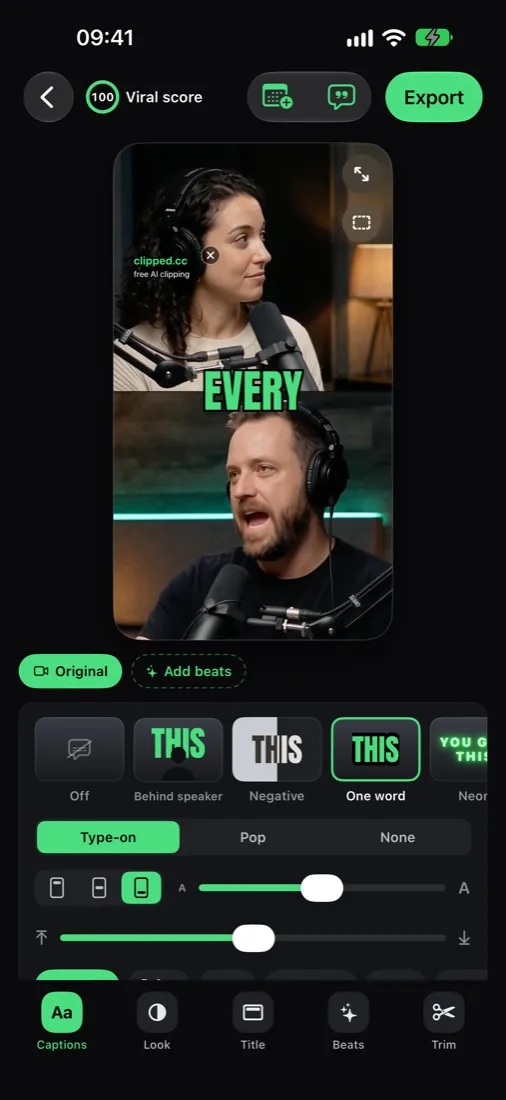
What Clipped's output looks like.
A long podcast goes in; captioned 9:16 clips come out. The AI picks the layout per clip: split view for two speakers, blur fill for wide shots.

Head-to-head deep dives
Pick your comparison.
FAQ
Comparison questions, answered.
What's the best AI video clipper in 2026?
On iPhone and iPad, Clipped: every feature is free and your video never uploads. If you need a web tool, compare the free plans above: OpusClip and Vizard each give 60 credits a month.
Submagic vs OpusClip: which is cheaper?
As checked in October 2026: OpusClip Starter is $15/mo and it has a free plan. Submagic Starter is $19/mo, or $12/mo billed yearly, for 15 videos a month up to 2 minutes each, with no free plan listed.
Klap vs OpusClip?
Klap Basic is $14/mo billed yearly for 100 clips a month, with one free video to try. OpusClip has a free plan and Starter at $15/mo. Both process video in the cloud.
Vizard vs OpusClip?
Vizard's free plan gives 60 credits a month (1 credit = 1 minute), 720p export, 3 days of storage. OpusClip's free plan gives 60 credits a month with a watermark, and free clips must be exported within 3 days.
Is there a free alternative to all four?
Yes. Clipped is free with every feature, on iPhone and iPad. Nothing uploads and nothing is metered. One optional one-time purchase removes the small watermark.
Which one works offline?
Clipped. Transcription, clip finding, reframing, captions and export run on the device. The others are cloud services.
Which one keeps my video private?
Clipped never uploads your video. The cloud tools need it on their servers to process it.
Which ones work on iPhone?
Clipped runs on iPhone and iPad, on the device. OpusClip has an iPhone app, but it uses credits and processes your video in the cloud. Submagic, Klap and Vizard are web tools.
Which one exports the highest quality?
Vizard goes up to 4K on paid plans; its free plan exports at 720p. Clipped exports up to 1080p at 60 fps on every clip, free ones included, with audio levelled to -14 LUFS.
Which one has the most caption styles?
Submagic has the larger template library. Clipped has 11 styles (including Behind speaker, One word and Negative), 8 fonts, any colour and caption translation, all free and on device.
Do I need an account?
For OpusClip, Submagic, Klap and Vizard, yes. Clipped has no account and no sign-in.
What does Clipped 3.0 include?
iPad support, a Schedule tab with post reminders, Translate captions, an AI Post caption, your @handle on every clip, 1080p at 60 fps, and Remove pauses.
Keep going
Related pages.
Best AI clipping apps →
The iPhone list.
OpusClip alternative →
Free, no credits.
Submagic alternative →
Captions without a plan.
Captions app alternative →
Free, on device.
quso.ai alternative →
Formerly vidyo.ai.
Pictory alternative →
No trial clock.
Private AI clipper →
Nothing uploads.
Free AI clip maker →
Which free plans are real.
Ready to start?
The free, on-device pick.
Skip the credit math. Clipped is free on the App Store, and your video never leaves your phone.
Download on the App Store