Checked October 2026 on each app's App Store page and pricing page. We make Clipped; it is listed first.
iPhone apps · 7 min read
The best AI clipping apps for iPhone in 2026.
Most “best clipping app” lists are years old and mix in desktop tools. This one covers iPhone apps only, and asks one question first: does the app find the clips for you?
Quick answer
Three iPhone apps find clips in a long video for you: Clipped, OpusClip and Vizard (Captions does it on its paid Max plan). Clipped is the only one that runs the AI on the phone, so the video never uploads and every feature is free. CapCut and Edits are good editors; you cut the moments by hand.
At a glance
| App | Finds clips for you | Video stays on phone | Credits | Free |
|---|---|---|---|---|
| Clipped | Yes | Yes, never uploads | None | Every feature (watermark) |
| OpusClip | Yes | No, stored 3 days (free) | Monthly credits | Yes, watermark, 3 day storage |
| Vizard | Yes | No, stored 3 days (free) | 60 credits/mo free | Yes, 720p, 3 day storage |
| Captions | On the Max plan | Not stated | 500/mo on Max | Limited features |
| CapCut | No (manual) | Not stated | AI credits on Pro | Basic tools |
| Edits | No (manual) | Not stated | None listed | Free, no watermark |
Pricing checked October 2026. All six apps have an iPhone app.
1. Clipped: the on-device AI clipper
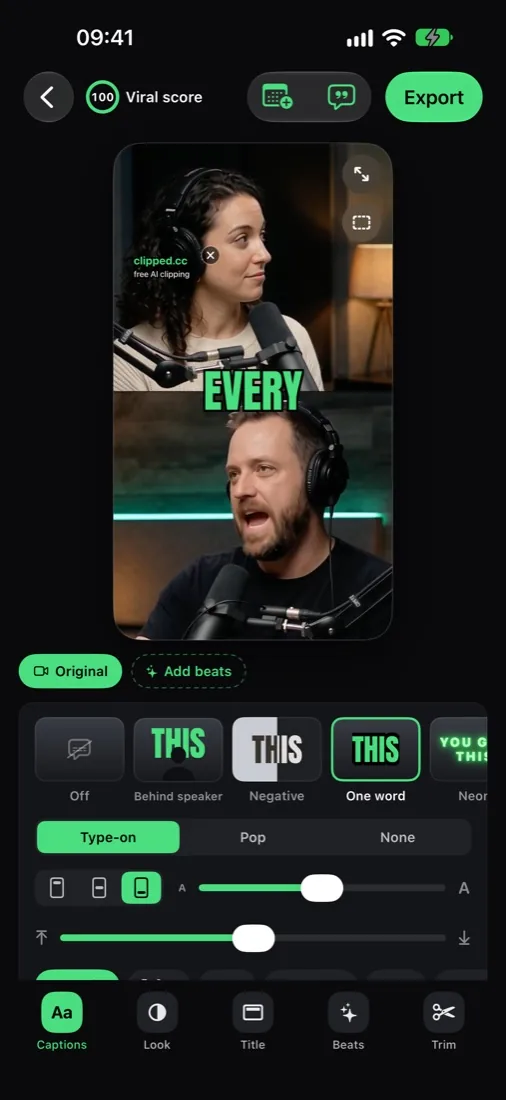
Open a long video from Photos or Files. Clipped transcribes it, finds the moments, reframes them to 9:16 and burns in captions, all on the iPhone.
- Pick your engine: Apple Intelligence (no download), Qwen 3.5 4B, Qwen 3.5 2B, LFM 2.5 1.2B, or No AI.
- Judge picks clips: a downloaded model rates moments across the whole video. Picks also use laughter, applause and big reactions.
- Viral score 0 to 100 on every clip. Tap it to see why, so you post the strong ones first.
- How many clips? 1-3 up to 10+. How long? Auto, 15, 30, 60 or 90 seconds.
- Face tracking keeps the speaker in frame. Podcast split screen and blur fill for wider shots. 9:16, 1:1 or 4:5.
- Captions in 14 languages and 11 styles. Translate captions to reach another audience.
- Export 1080p, up to 60 fps, audio levelled to -14 LUFS (the loudness TikTok, Reels and Shorts use).
Pros: the video stays on your phone, works offline, every feature free with no credits.
Cons: needs iOS 26; free exports carry a small clipped.cc watermark (one optional one-time purchase removes it); it reminds you to post but does not post for you.
2. OpusClip
Per its App Store page, you drop in or record a long video. The AI picks the best parts, clips and captions them, and you can post or schedule to connected accounts.
Pricing (checked October 2026): free with monthly credits; on the web, Starter $15/mo and Pro $29/mo. The free plan exports with a watermark and media expires after 3 days.
Pros: mature clip finding, direct posting. Cons: credits; your media is stored on OpusClip.
3. Vizard
Per its App Store page, it finds highlights with scene and speech detection, adds captions and resizes to 9:16. It also removes silences, and you can guide clipping with a topic.
Pricing (checked October 2026): free plan with 60 credits a month (1 credit is 1 minute), 720p export, 3 day storage, 60 minute uploads. The paid Creator plan removes the watermark.
Pros: topic guided clipping. Cons: credits by the minute.
4. Captions
An AI editor with subtitles in many languages, dubbing and AI avatars. Its pricing page lists “Turn a long video into a batch of post-ready clips” on the Max plan.
Pricing (checked October 2026): free plan with limited features; Max $24.99/mo with 500 credits (iOS pricing).
Pros: wide AI toolset. Cons: clipping is a paid feature.
5. CapCut
A full editor: timeline, keyframes, auto captions, effects. You choose and cut the moments.
Pricing (checked October 2026): free plan with basic tools; Pro priced by region.
Pros: total control. Cons: slow for 3 to 5 clips a day.
6. Edits (by Instagram)
Instagram's free editor, with auto captions and frame accurate edits. Exports carry no watermark.
Pros: free, clean exports. Cons: no automatic clip finding listed.
Not on the list
Klap and Submagic are popular clippers, but we found no official iPhone app for either in October 2026. They run in the browser. Browser tools compared: best app for clippers.
Clip a video on iPhone in 3 steps
- Import an MP4 or MOV from Photos or Files.
- Let the AI pick. Sort by viral score.
- Polish and export: Captions, Look, Text, Beats, Trim, Post.
Go deeper: AI video clipper for iPhone, auto captions, auto reframe to vertical, private, on-device clipping, turn a long video into shorts.
Real output, straight from the app.
A long podcast goes in; captioned 9:16 clips come out. The AI picks the layout per clip: split view for two speakers, blur fill for wide shots.
interview_ep42.mp4
ON DEVICE · 0% NETWORK6 CLIPS FOUND

FAQ
iPhone clipping apps, answered.
What is the best AI clipping app for iPhone?
Clipped, if you want the AI to run on the phone: it finds the moments, reframes to 9:16 and captions them without uploading the video. No account, no credits. OpusClip and Vizard are the best known credit based options with iPhone apps.
Is there an auto clip app for iPhone that is free?
Yes. Clipped is free with every feature included. Exports carry a small clipped.cc watermark; one optional one-time purchase removes it. OpusClip and Vizard also have free plans, limited by monthly credits.
Can an iPhone app clip videos offline?
Clipped can. Transcription, clip finding, reframing, captions and export all run on the iPhone. Internet is only used for optional one-time downloads, like an AI model.
Which iPhones can run Clipped?
Any iPhone or iPad on iOS 26. The Apple Intelligence engine needs an Apple Intelligence iPhone, and the largest model (Qwen 3.5 4B) needs an 8 GB RAM iPhone (iPhone 15 Pro or newer). The smaller models and No AI run on the rest.
Do Klap or Submagic have an iPhone app?
We found no official Klap or Submagic app on the US App Store in October 2026. Both run in a browser.
Can CapCut or Edits find clips automatically on iPhone?
Their App Store pages list auto captions and editing tools, not automatic clip finding from a long video. You pick and cut the moments yourself. CapCut's website lists a Long video to shorts tool without saying which plan includes it.
How long a video can I clip on iPhone?
Clipped takes MP4 or MOV from Photos or Files, up to 2 hours long. Vizard's free plan lists a 60 minute upload limit.
Auto clip on iPhone
The AI clipper that stays on your phone.
Clipped finds the moments, reframes and captions them on the device. Free, and the video never uploads.
Download on the App Store