AI clip maker for iPad
The AI video clipper
on iPad.
Long video in, captioned shorts out, on the big screen. The AI runs on the iPad, and every feature is free.
Free download. No account, and your video never uploads.
2h
Max video length
MP4 or MOV, Photos or Files.
6
Studio tools
Captions, Look, Text, Beats, Trim, Post.
0
Uploads
Everything runs on the iPad.
Real output, on iPad too.
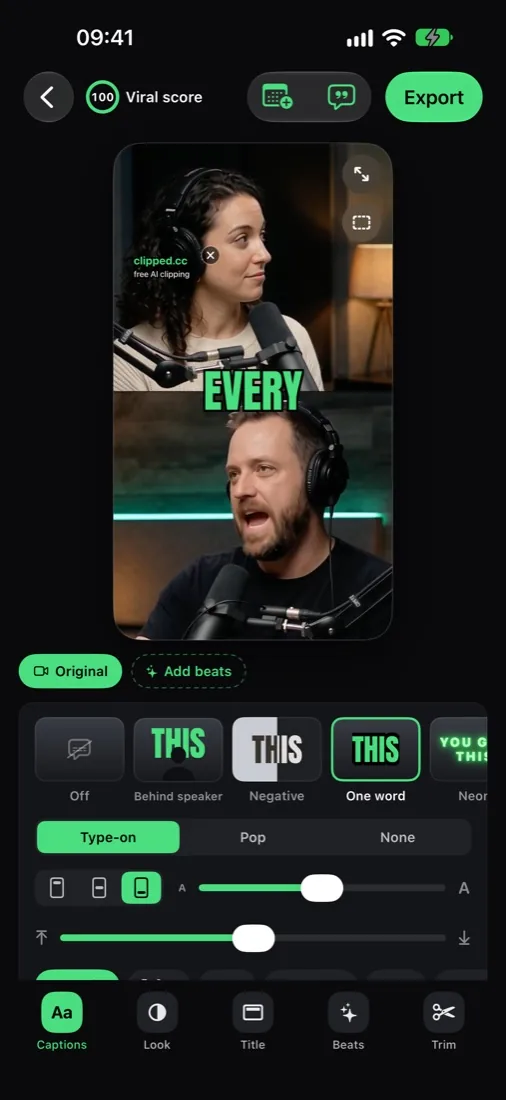
The same clips as on iPhone: split screen for two speakers, blur fill for wide shots, captions burned in.

How it works
Make shorts on iPad in three steps.
01
Load the long video
MP4 or MOV from Photos or Files, up to 2 hours. A podcast, a stream, a talk.
02
Let the AI pick
On-device AI finds the moments, scores each one 0 to 100 and tells you why. Choose how many clips and how long.
03
Polish and export
Captions, looks, beats, trim, then export 9:16, 1:1 or 4:5 in up to 1080p. All on the iPad.
Why iPad
A bigger screen for your clips.
Made for the big screen
Layouts built for the iPad screen.
The full app
One app for iPhone and iPad: AI clip finding, Viral score, reframing, captions, beats.
On device
Your footage never uploads, and you never sign in.
Free
Every feature is free. One optional one-time purchase removes the watermark.
The details
What you get on iPad.
Clipped vs cloud clippers
No browser tab. No upload.
Feature
clipped
FREE · IPAD · OFFLINE
Cloud tools
WEB · UPLOAD
FAQ
Clipping on iPad, answered.
Does Clipped run on iPad?
Yes. Clipped runs on iPad with iOS 26, with layouts made for the bigger screen.
How do I make shorts on iPad?
Open a long video in Clipped. The AI finds the best moments, reframes them to 9:16 with face tracking and adds captions. Edit in the clip studio, then save or share.
Is it the same app as on iPhone?
Yes. One app runs on iPhone and iPad (iOS 26), with layouts made for each screen.
Does my video upload to the cloud?
No. Transcription, clip finding, reframing, captions, edits and export all run on the device. There is no account to create.
Which AI engines can I use?
Apple Intelligence (built in), Qwen 3.5 4B, Qwen 3.5 2B, LFM 2.5 1.2B, or No AI (rule based). Downloaded models are optional and can be deleted in Settings. Which engines show depends on the device.
What formats can I export?
9:16, 1:1 and 4:5, in 720p or 1080p, at 30 or 60 fps (or Auto). Audio is levelled to -14 LUFS.
Is it free on iPad?
Yes. Every feature is free. Exports carry a small clipped.cc watermark; one optional one-time purchase removes it. No subscription, no credits.
Related
Free on iPad
Make shorts on iPad, free.
On-device AI, captions and 9:16 reframing. Free on the App Store.
Download on the App Store