FAQ
Clipping & Clipped:
everything answered.
Short answers on Clipped, clipping, money, copyright and privacy. Jump to a topic below.
Sections
Jump to a topic.
About Clipped
About Clipped.
What is Clipped?
Clipped is a free, on-device AI video clipper for iPhone and iPad. It turns long videos (podcasts, interviews, livestreams, YouTube uploads, sermons) into clips for TikTok, Reels and YouTube Shorts: it picks the best moments, gives each a viral score, tracks faces to 9:16, 1:1 or 4:5, and adds captions. Everything runs on the phone, so your video never uploads and you never make an account.
Is Clipped really free?
Yes. Every feature is free. Exports carry a small clipped.cc watermark. One optional one-time purchase removes it. Your own @handle can sit on every clip, free or not. There is no subscription to cancel, no credits to run out and no limit on how many videos you clip.
Does Clipped work offline?
Yes. Transcription, clip finding, reframing, captions, edits and export all run on the iPhone. Internet is only used for optional one-time downloads: an AI model (730 MB to 2.7 GB, or none with Apple Intelligence or No AI) and a language pack the first time you translate captions into a new language.
Does Clipped upload my video?
No. The video never leaves your iPhone. There is no account and no sign-in.
What iPhone do I need?
Clipped needs iOS 26 and runs on iPhone and iPad. The largest model, Qwen 3.5 4B, needs an 8 GB RAM iPhone (iPhone 15 Pro or newer).
Which AI model does Clipped use?
You pick: Apple Intelligence (built in, no download), Qwen 3.5 4B (about 2.7 GB, best quality), Qwen 3.5 2B (about 1.3 GB, balanced), LFM 2.5 1.2B (about 730 MB, fastest) or No AI (rule based). Open models run on the phone through llama.cpp, and you can delete them in Settings.
Which languages does it support?
14 languages, transcribed on device: English, Italian, Spanish, French, German, Portuguese, Dutch, Russian, Turkish, Arabic, Hindi, Japanese, Korean and Chinese.
Can I translate captions?
Yes. Translate captions uses Apple Translation. The first time you pick a new language, iOS downloads a language pack; after that it works offline.
What is the Behind speaker caption style?
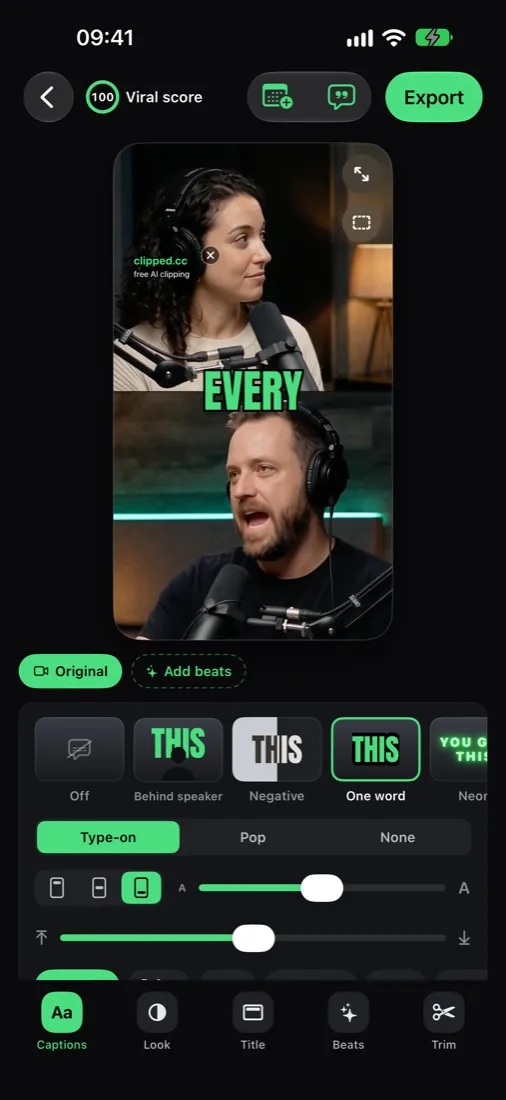
A big word placed between the background and the person, so the text sits behind the speaker. It is one of 11 caption styles, next to One word and Negative.
Can Clipped plan my posts?
Yes. The Schedule tab has Day, Week and Month views. Schedule a clip on TikTok, Instagram, YouTube Shorts, Facebook, X or Snapchat and get a local reminder at the time. Clipped does not post for you: you share the export.
Can Clipped write the caption for my post?
Yes. The Post tool writes a Post caption: a hook, the body and hashtags. Copy caption, or Write another. It uses the engine picked on Home (not available with No AI).
Does my @handle show on clips?
Yes. Set it in Settings or in the Text tool. It shows on every clip and export, free ones included: next to the watermark when free, on its own after the purchase.
Can it cut silences?
Yes. Remove pauses in the Trim tool cuts silences and filler words in one tap. Restore pauses undoes it.
What quality does Clipped export?
720p or 1080p, at 30 or 60 fps (or Auto). Formats 9:16, 1:1 and 4:5. Audio levelled to -14 LUFS (the loudness TikTok, Reels and Shorts use) with a peak limiter, so clips play at the same volume as the rest of the feed.
What does the viral score mean?
Every clip gets a score from 0 to 100, so you know which to post first. Tap it to see why, for example "Laughter at 0:12", "Applause" or "Strong opening line". Labels: Strong moment, Good moment, Worth a look.
How long can the video be?
Up to 2 hours. Import an MP4 or MOV from Photos or Files.
How many clips does it make?
You pick: 1-3, 3-5, 5-7, 7-10 or 10+ (keeps every clip it finds; the rest render in the background). Length: Auto, 15, 30, 60 or 90 seconds. Find different clips runs the same video again and skips the moments it already picked.
Can I change a clip the AI picked?
Yes. The clip screen has six tools: Captions, Look, Text, Beats, Trim and Post. Trim or extend a clip past its edges, or cut a New clip from any part of the original video. Choices are saved per clip.
What does Hook: best moment first do?
It is a Beats option. The strongest line of the clip plays first as a cold open, then the clip runs from the start.
Does Bleep swears mute the audio?
No. Bleep swears stars swear words in the captions. The audio is not changed.
Can I see how the clip looks on TikTok before posting?
Yes. App buttons preview shows the clip under the TikTok, Reels or Shorts buttons, so you can check nothing important hides behind them.
Can I make a quote card?
Yes. Quote card turns one line into a still image over a frame from the clip, in several layouts.
Does Clipped run on iPad?
Yes. Clipped runs on iPad (iOS 26) with layouts made for the bigger screen.
Is Clipped on Android?
No. Clipped runs on iPhone and iPad.
What is video clipping
What is video clipping.
What is clipping?
Clipping is taking long-form video (podcasts, livestreams, YouTube uploads, interviews) and turning it into 15 to 60 second vertical clips for TikTok, Reels and YouTube Shorts. Clippers either run their own accounts (paid by view via campaigns like Whop) or deliver clips to a creator (paid per clip or per view).
How much do video clippers make?
Clippers are paid per 1,000 views. On Whop's Content Rewards board on October 24, 2026, rates ran from $0.10 to $3, and $1 was the most common. Live Vyro campaigns showed $1.50 and $2.50, and Klippify advertises $1 per 1,000 verified views. The math: 500,000 views in a month at $1 per 1,000 pays $500.
Is clipping a good side hustle in 2026?
It can be, but competition has grown. Pure copy-paste clippers struggle. Clippers with a niche, fast turnaround and 3 to 5 posts a day do better.
Do I need a laptop to clip videos?
No. With Clipped the whole workflow runs on an iPhone or iPad, from import to export. See our guide on making money clipping with iPhone only.
What's the best app to clip videos for TikTok?
For free on iPhone and iPad: Clipped. It runs on the device, with no credits to buy. The comparison page and the best TikTok clip apps page list the cloud options with prices checked October 2026.
How long should a TikTok clip be?
Short enough to be watched to the end. In Clipped, How long? offers Auto, 15, 30, 60 or 90 seconds.
Copyright & permission
Copyright & permission.
Do I need permission to clip someone's podcast?
For commercial use: yes. For commentary, criticism or education, fair use often applies in the US, but enforcement varies. The cleanest path is paid clipping campaigns (Whop, Vyro) where rights are pre-granted, or a direct message to the creator. Many podcasters welcome attributed clips because they bring in listeners.
How do I avoid copyright strikes when clipping?
Three rules: (1) Only clip videos you have rights to: paid campaigns, your own content, or explicit permission. (2) Don't leave another channel's watermark as the focus of your clip. (3) Don't add music you have no rights to. Watch for Content ID on YouTube.
Is fair use a defense for clipping?
Sometimes, for commentary, criticism or transformative use. But only a court decides fair use, long after a strike lands. For commercial clipping (paid programs), always get explicit rights via the campaign.
Whop & paid programs
Whop & paid programs.
How do clippers get paid on Whop?
You post the clip on your own account and submit it to the campaign. Once the views are verified, you get paid at the campaign's rate per 1,000 views. Each campaign sets its own payout terms, so read them before posting.
What's the highest-paying clipping program?
Rates change campaign by campaign. On October 24, 2026, the top rate on Whop's Content Rewards board was $3 per 1,000 views, and live Vyro campaigns showed up to $2.50. Check each campaign page for its current rate and view cap before you start.
Can you clip videos for free without a subscription?
Yes. Clipped is free with no subscription and no credits. Exports carry a small clipped.cc watermark; one optional one-time purchase removes it. Cloud clippers meter free use: as checked in October 2026, OpusClip's and Vizard's free plans each give 60 credits a month.
Privacy
Privacy.
Is Clipped private?
Yes. Your footage never leaves your iPhone or iPad, and you never sign in. The only internet use is optional: an AI model download and translation language packs.
Real output, straight from the app.
A long podcast goes in; captioned 9:16 clips come out. The AI picks the layout per clip: split view for two speakers, blur fill for wide shots.
Keep going
Related pages.
Ready to start?
Your next clip is already on your phone.
Free on the App Store. Your video stays on your phone, and you never make an account. One optional one-time purchase removes the watermark.
Download on the App Store