Captions app alternatives · 2026
Best Captions App Alternatives in 2026 (Free, on iPhone)
Captions (by Mirage) is a strong AI editor, but long video to clips is listed under Max at $24.99/mo. These 6 tools do captions and clips, and one does both free on your iPhone.
At a glance
The short list.
| Tool | Best for | Free plan | Starting price | Upload needed | Platform |
|---|---|---|---|---|---|
| Clipped | Clipping on iPhone or iPad with no upload, no account, no credits | Every feature free, small watermark | $0. One optional one-time purchase removes the watermark | No. Runs on the device | iPhone and iPad (iOS 26) |
| CapCut | Manual editing with templates on phone and desktop | Free plan: templates and basic tools | Pro EUR 29.99/mo (shown to us; varies by account) | Not stated | iPhone, Android, desktop, web |
| OpusClip | Web clipping with auto posting and team plans | 60 credits/mo, watermark, export within 3 days | Starter $15/mo (monthly only) | Yes, cloud | Web, iPhone app |
| Submagic | Animated captions on short videos | No free plan listed (free try) | Starter $19/mo, or $12/mo yearly | Yes, cloud | Web |
| Vizard | Long uploads and 4K export on a paid plan | 60 credits/mo, 720p export, 3-day storage | Creator $29/mo, or $14.50/mo yearly | Yes, cloud | Web |
| Descript | Editing podcasts and talking video by text, then clipping | 60 media minutes/mo, 720p export | Hobbyist $16/mo yearly, $24 monthly | Import into the app (media minutes) | Mac and Windows app |
Pricing checked October 2026 on each tool's own pricing page. Plans, regional prices and promos change; check their site before you pay.
For reference
Captions itself: free version with basic tools and no AI credits. Max $24.99/mo (500 credits, includes long video to clips). Frontier $69.99/mo (1,400 credits). Prices are its iOS plans. iPhone app, Android and web.
Reviews
The tools, one by one.
1. Clippedour app
Best for: Clipping on iPhone or iPad with no upload, no account, no credits. · iPhone and iPad (iOS 26)
Pricing
- $Free: every feature, no credits.
- $Exports carry a small clipped.cc watermark.
- $One optional one-time purchase removes it. No subscription.
Pros
- +No account, no upload, no credits. Works offline.
- +AI finds clips and gives each a viral score with reasons.
- +Face tracking reframe to 9:16, 1:1 or 4:5. Podcast split screen.
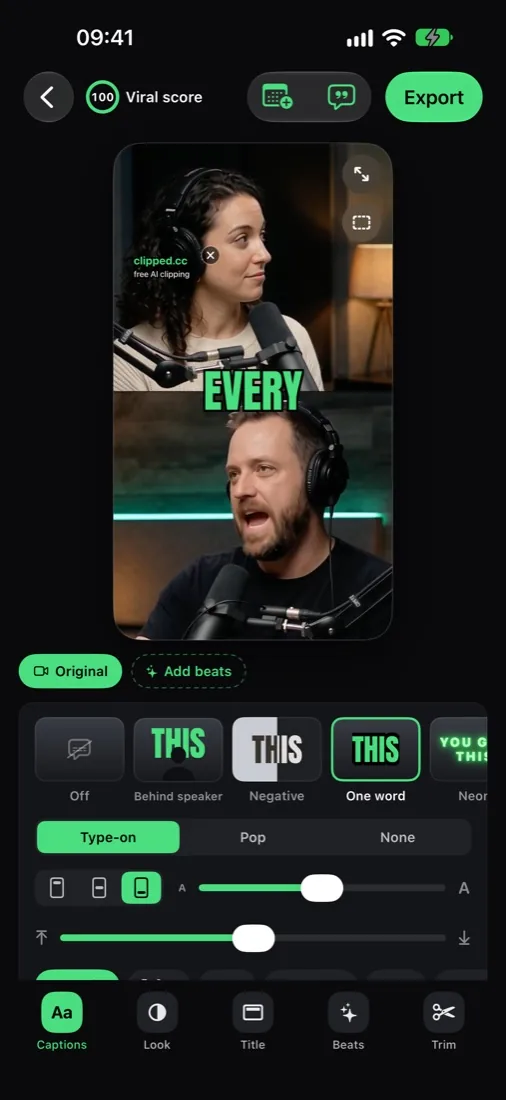
- +11 caption styles, 14 languages, translate captions on device.
- +Remove pauses, Beats (zooms, count-ups, sound effects), posting schedule.
Cons
- −iPhone and iPad only, needs iOS 26. No web or Android.
- −Imports from Photos or Files (MP4 or MOV, up to 2 hours).
- −Free exports carry a small watermark.
- −Reminds you to post; it does not post for you.
2. CapCut
Best for: Manual editing with templates on phone and desktop. · iPhone, Android, desktop, web
Pricing
- $Free: free templates and basic editing tools.
- $Pro: EUR 29.99/mo or EUR 259.99/yr on the page we saw, 650 AI credits a month. Ultra: EUR 68/mo.
- $CapCut says displayed pricing is for reference only; sign in to see your price.
Pros
- +Full manual editor with a huge template library.
- +Long video to shorts tool.
- +Runs on almost every device.
Cons
- −AI features sit on Pro with AI credits.
- −You still pick and cut most moments yourself.
- −Price depends on your account and region.
Source: capcut.com pricing, checked October 2026
3. OpusClip
Best for: Web clipping with auto posting and team plans. · Web, iPhone app
Pricing
- $Free: 60 credits a month, watermark, clips stop being exportable after 3 days.
- $Starter: $15/mo, 150 credits a month, monthly billing only.
- $Pro: $29/mo monthly, or $14.50/mo billed yearly ($174), 300 credits a month.
- $Business: custom.
Pros
- +Virality Score on every clip.
- +AI captions in 20+ languages.
- +Auto post to YouTube Shorts, TikTok and Reels on paid plans.
- +Paste a link (YouTube, Zoom) in the iPhone app.
Cons
- −Account and credits on every plan.
- −Free clips carry a watermark and expire for export after 3 days.
- −Video is processed in the cloud.
Source: opus.pro pricing, checked October 2026
4. Submagic
Best for: Animated captions on short videos. · Web
Pricing
- $Starter: $19/mo, or $12/mo billed yearly. 15 videos a month, up to 2 minutes each.
- $Pro: $39/mo, or $23/mo billed yearly. 40 videos, up to 5 minutes.
- $Business: $69/mo, or $41/mo billed yearly. 100 videos, up to 30 minutes.
Pros
- +Caption styles are the core product.
- +No watermark on paid plans.
- +Magic Clips turns a long video or YouTube link into clips.
Cons
- −No free plan on the pricing page.
- −Starter caps videos at 2 minutes.
- −Magic Clips limits are not listed per plan.
Source: submagic.co pricing, checked October 2026
5. Vizard
Best for: Long uploads and 4K export on a paid plan. · Web
Pricing
- $Free: 60 credits a month (1 credit = 1 minute), 720p export, 3-day storage.
- $Creator: $29/mo, or $14.50/mo billed yearly ($174). No watermark, 4K.
- $Business: $39/mo, or $19.50/mo billed yearly ($234).
Pros
- +Free plan takes uploads up to 60 minutes.
- +Subtitle translation and auto reframe.
- +Post scheduling on Creator.
Cons
- −Free exports are 720p and up to 10 minutes long.
- −Free videos are stored for 3 days.
- −Every uploaded minute costs a credit.
Source: vizard.ai pricing, checked October 2026
6. Descript
Best for: Editing podcasts and talking video by text, then clipping. · Mac and Windows app
Pricing
- $Free: 60 media minutes a month, 720p export.
- $Hobbyist: $16/mo billed yearly, $24 monthly. 10 media hours, 1080p without watermark.
- $Creator: $24/mo billed yearly, $35 monthly. 30 media hours, 4K.
Pros
- +Edit video like a document.
- +Create Clips, Remove Filler Words, Studio Sound.
- +Transcription in 25 languages.
Cons
- −A full editor: more to learn than a one-tap clipper.
- −Desktop app (macOS 14 or Windows 11), not a phone app.
- −Media minutes cap every plan.
Source: descript.com pricing, checked October 2026
Captions and clips, free, on the phone.
A long podcast goes in; captioned 9:16 clips come out. The AI picks the layout per clip: split view for two speakers, blur fill for wide shots.

Why Clipped
The clips and captions, without Max.
Clips from long video, free
AI finds and scores moments in videos up to 2 hours. No credits.
11 caption styles
Karaoke, Neon, Behind speaker, One word, Negative and more. 8 fonts, any colour.
On device, private
Transcription in 14 languages runs on the iPhone. The video never uploads.
iPhone and iPad
Layouts made for the iPad screen too. No account needed.
How to pick
Pick by what you need.
| If you want | Pick |
|---|---|
| Free captions and clips on iPhone or iPad | Clipped |
| Manual editing with templates | CapCut |
| Web clipper with auto posting | OpusClip |
| Caption styles on short videos | Submagic |
| Long uploads on the web | Vizard |
| Edit by text on desktop | Descript |
FAQ
Captions app alternatives, answered.
Is the Captions app free?
Captions has a free version with basic tools like trimming and transitions, 1 caption template and no AI credits. Max is $24.99/mo with 500 credits. Captions says these are its iOS prices. Checked October 2026 on captions.ai/pricing.
What is the best free alternative to the Captions app?
On iPhone or iPad: Clipped. 11 caption styles, 8 fonts, 14 languages, and AI that cuts clips from long videos, all free and on the device. One optional one-time purchase removes the small watermark.
Can Clipped turn a long video into clips like Captions Max?
Yes, on the free version. Import a video up to 2 hours; the AI finds the moments, scores them, reframes to 9:16 and adds captions on the device.
Does Clipped have AI avatars or AI twins?
No. Clipped edits the video you already have: clips, captions, reframing, looks and Beats. For AI actors and avatars, Captions is the better fit.
Can Clipped translate captions?
Yes. Translate captions uses Apple Translation on the device. A language downloads once, then works offline.
Who makes the Captions app?
Captions is made by Mirage (NOCAP, Inc. d/b/a Captions, per its site). Clipped is not affiliated with Captions or Mirage.
More comparisons
Other alternative lists.
Captions for $0
Captioned clips, free on your iPhone.
Free on iPhone and iPad. Your video never leaves the device, and there are no credits. One optional one-time purchase removes the watermark.
Download on the App Store