Offline AI clip maker
The private AI video clipper
on iPhone and iPad.
Cloud clippers upload your footage. Clipped runs the AI, the captions and the export on your device. No account needed.
Free download. No account, and your video never uploads.
0
Uploads
Your video never leaves the device.
0
Accounts
No sign-in, no email.
5
Engine choices
All run on the device.
Quick answer
Clipped (clipped.cc) is an AI video clipper that runs on your iPhone or iPad. It transcribes, finds the best moments, reframes to 9:16, adds captions and exports, all on the device. The video never uploads and there is no account. Internet is only used for optional one-time downloads. Every feature is free.
What runs where
On the device. All of it.
Private doesn't mean basic.
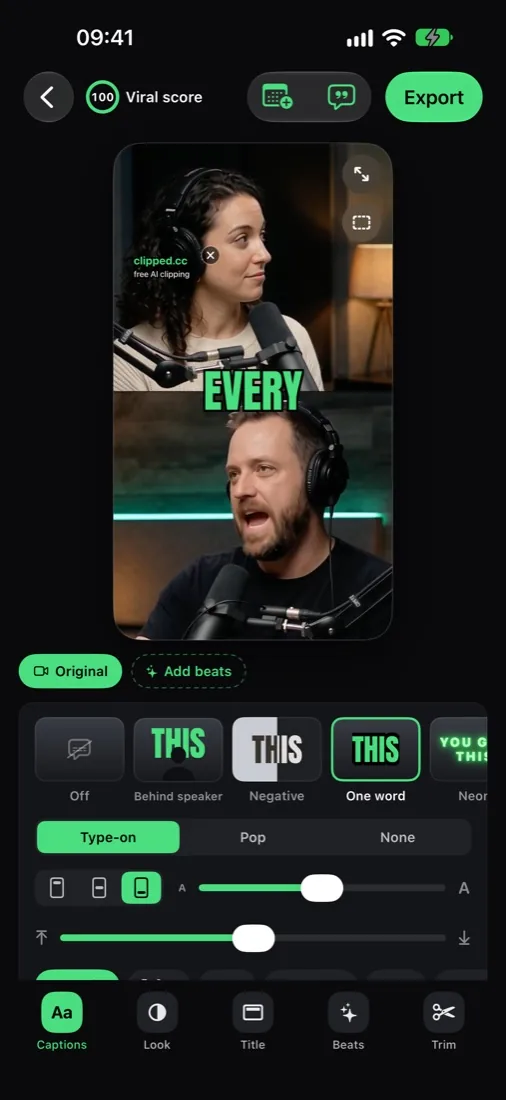
Real clips made on device: split screen for two speakers, blur fill for wide shots, captions burned in.

How it works
Three steps, zero uploads.
01
Pick an engine
Apple Intelligence (built in), an open model you download once, or No AI. All of them run on the device.
02
Open your video
From Photos or Files, MP4 or MOV, up to 2 hours. It stays on the phone.
03
Clip and export, offline
Transcription, clip finding, reframing, captions and export all run locally. Airplane mode is fine.
Pick your engine
Every option runs locally.
Apple Intelligence
Built in, no download. Needs an Apple Intelligence iPhone.
Qwen 3.5 4B
About 2.7 GB. Best quality. Needs an 8 GB RAM iPhone (iPhone 15 Pro or newer).
Qwen 3.5 2B
About 1.3 GB. Balanced, every language.
LFM 2.5 1.2B
About 730 MB. The fastest, and the smallest download.
No AI
Rule based, no download.
Delete anytime
Downloaded models can be removed in Settings.
Clipped vs cloud clippers
Your footage, your device.
Feature
clipped
Free, iPhone and iPad, offline
Cloud tools
WEB · UPLOAD
FAQ
On-device AI video, answered.
Is there an AI video clipper that doesn't upload my video?
Yes. Clipped runs on iPhone and iPad. Transcription, clip finding, reframing, captions, edits and export all happen on the device. The video never uploads.
Do I need an account?
No. You never sign in or give an email.
When does Clipped use the internet?
Only for optional one-time downloads: an AI model, if you pick one, and a language pack the first time you translate captions into a new language. After that it works offline.
Which AI runs on the device?
Your pick: Apple Intelligence (built in, no download), Qwen 3.5 4B (about 2.7 GB, needs an 8 GB RAM iPhone), Qwen 3.5 2B (about 1.3 GB), LFM 2.5 1.2B (about 730 MB), or No AI (rule based). Open models run on the phone through llama.cpp.
How is speech transcribed?
On device with Apple Speech, in 14 languages: English, Italian, Spanish, French, German, Portuguese, Dutch, Russian, Turkish, Arabic, Hindi, Japanese, Korean and Chinese.
Can I delete downloaded models?
Yes, in Settings.
Do the posting reminders send anything?
No. The Schedule sets local reminders on the phone. Nothing leaves the device, and Clipped does not post for you: you share the export.
Is it free?
Yes. Every feature is free. Exports carry a small clipped.cc watermark; one optional one-time purchase removes it. No subscription, no credits.
Related
Private by design
Clip with AI. Keep your footage.
Free on the App Store. Your footage never leaves your device.
Download on the App Store