Clipped vs Klap
Like Klap,
but free and on device.
Klap is a web AI clipper billed by clips per month. Clipped finds and captions clips on your iPhone or iPad, free and offline. Your video never uploads.
Free download. No account, and your video never uploads.
Quick answer
Pick Klap if you want a hands-off web clipper and are happy to pay yearly for a set number of clips a month. Pick Clipped if you want to clip on iPhone or iPad for free, with no clip quota. Your video stays on the device.
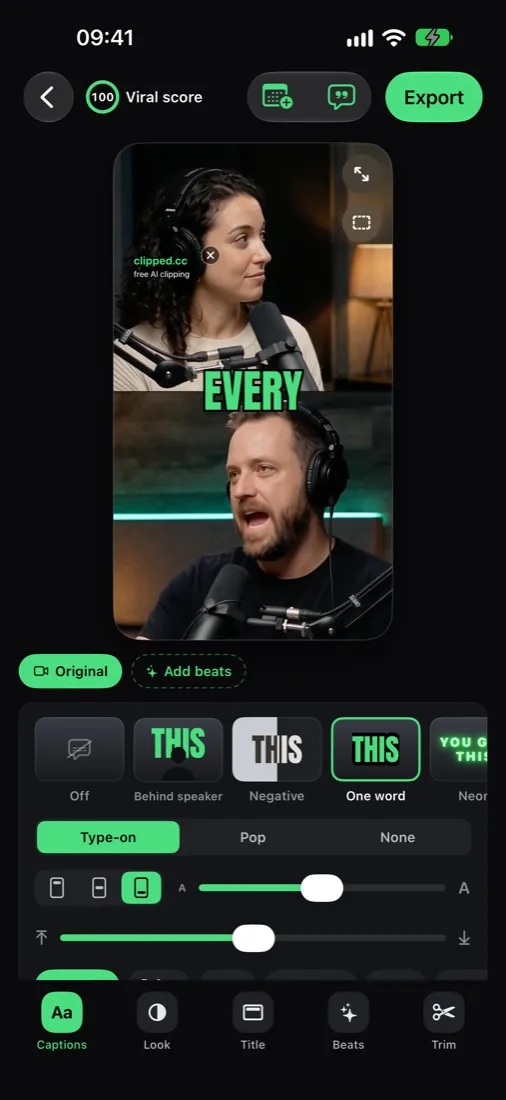
What Clipped's output looks like.
A long podcast goes in; captioned 9:16 clips come out. The AI picks the layout per clip: split view for two speakers, blur fill for wide shots.
Side-by-side
Clipped vs Klap.
Feature
clipped
Free, iPhone and iPad, offline
Klap
FROM $14/MO YEARLY · CLOUD · WEB
Klap: strengths
- ✓Simple clip pipeline
- ✓Clean web app
- ✓Unlimited social accounts and analytics on every plan
Klap: trade-offs
- ·Subscription (100 clips/mo on Basic)
- ·Monthly prices not shown on the pricing page
- ·Your video is uploaded
- ·Browser only
Who it suits
Pick Klap or Clipped?
Pick Klap if
- →You work in a browser on a computer and don't want an app.
- →You like paying for clips generated rather than minutes uploaded.
- →You manage several social accounts: Klap includes unlimited social accounts and analytics on every plan.
- →You need Android or Windows. Clipped is iPhone and iPad only.
Pick Clipped if
- →You want a free plan that stays free. Klap's free try is one video.
- →You don't want to commit to a yearly bill.
- →Your recordings are private and should stay on your phone.
- →You want hands-on control of each clip: captions, looks, Beats, trim and extend.
- →You want a posting plan with reminders for TikTok, Instagram, YouTube Shorts and more.
Workflow
How the workflow differs.
Klap: in the cloud
- 1Sign up in the browser.
- 2Upload a video. It is processed in the cloud.
- 3Klap generates clips. Each one counts toward your monthly quota.
- 4Review and edit the clips.
- 5Export, or use the connected social accounts.
Clipped: on the device
- 1Open the app. No account needed.
- 2Import a video from Photos or Files: MP4 or MOV, up to 2 hours.
- 3Pick an engine (Apple Intelligence, a downloadable open model, or No AI), how many clips and how long.
- 4Clipped finds the moments on the device. Each clip gets a viral score with the reasons behind it.
- 5Polish in the clip studio: Captions, Look, Text, Beats, Trim and Post.
- 6Save to the Camera Roll or share, and schedule a reminder for when to post.
Pricing
Klap pricing, explained.
| Plan | Price | What you get |
|---|---|---|
| Klap Free try | $0 | 1 video, from the klap.app home page. |
| Klap Basic | $14/mo billed yearly | 100 clips a month. |
| Klap Pro | $39/mo billed yearly | 300 clips a month. |
| Klap Pro+ | $94/mo billed yearly | 1,000 clips a month. |
| Clipped | $0 | Every feature, no credits, small watermark. One optional one-time purchase removes it. |
Klap bills by clips per month, and the pricing page shows yearly prices only. Basic works out to $168 a year for 100 clips a month. Clipped has no quota and no bill: every feature is free, and one optional one-time purchase removes the small watermark.
Pricing checked October 2026 on klap.app pricing. Plans and regional prices change; check their site before you pay.
Switching
Switching from Klap.
01
Keep your originals
Clipped imports from Photos or Files. Keep the full source video on the device, not just Klap's exports.
02
Set count and length
Choose how many clips (1-3 up to 10+) and how long (Auto, 15, 30, 60 or 90 seconds).
03
Go again for more
Find different clips runs the same video again and skips the moments it already picked.
04
Plan your posts
Schedule clips for TikTok, Instagram, YouTube Shorts, Facebook, X or Snapchat. You get a reminder; you share the export.
FAQ
Clipped vs Klap, answered.
Is there a free Klap alternative?
Yes. Clipped is free on iPhone and iPad, runs on the device and never uploads your video. Exports carry a small watermark; one optional one-time purchase removes it.
Is Klap free?
Klap lets you try it with 1 free video. After that, plans start at $14/mo billed yearly (Basic, 100 clips a month). Pro is $39/mo and Pro+ $94/mo, both billed yearly. Pricing checked October 2026 on klap.app.
Does Klap work on iPhone?
Klap is a web app that runs in the browser. Clipped is a native iPhone and iPad app (iOS 26) that works offline.
Does Clipped limit how many clips I make?
No. There are no credits and no monthly count. Pick 10+ clips and it keeps every clip it finds; the rest render in the background.
Can Clipped find different clips from the same video?
Yes. Find different clips runs the same video again and skips the moments it already picked.
Can Clipped post to my social accounts like Klap?
No. Clipped has a Schedule tab with reminders for each platform. Tap the reminder, then share the export. Nothing leaves the phone until you share.
Compare to other tools
Ready to start?
The free, on-device Klap alternative.
Free on the App Store for iPhone and iPad, with no subscription. Your video never leaves the device. One optional one-time purchase removes the watermark.
Download on the App Store